Overview
Project Overview
Welcome to Cloud & Attacks 101.
This course, referred to as a "Core Section", is all about learning the foundations of cloud computing, while working on hands-on scenarios to learn about cloud attack techniques and defenses deployed to protect production enterprise networks.
Built off of Enterprise 101 & Network & Attacks 101 topology and infrastructure, this Core Section is bundled with the basics, while attempting to explain the why.
The Overview Guide is here to help outline pertinent information related to this Core Section. It is assumed all infrastructure, accounts, and VMs have been deployed and configured in Enterprise 101 & Networks & Attacks 101.
👉 Cloud & Attacks 101 can be deployed and provisioned without the E101 or NA101, however, there will be a few scenarios in the defenses section that will not work, specifically the integration between our SIEM (Wazuh) and AWS.
Network Topologies
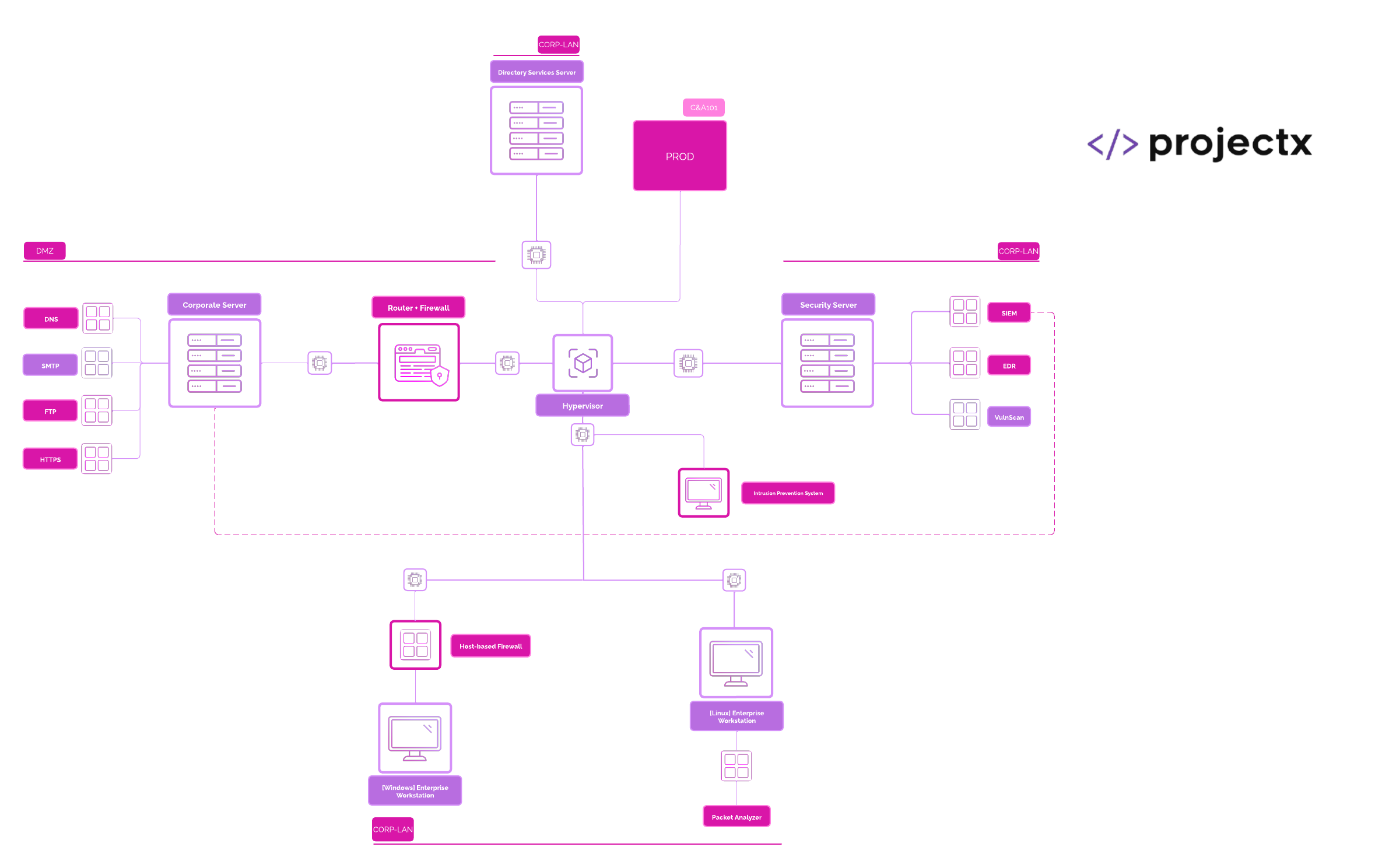
All topolgies were made with Lucidchart.
We will be configuring a few additional networks in our "Defenses" section.
Virtual Private Cloud (VPC): projext-vpc
Attacker
We will be performing "ad hoc" attacks. Instead of an end-to-end attack, like we saw in Enterprise 101, each of our attack scenarios will correspond to attack tactic (the why) and technique (the how).
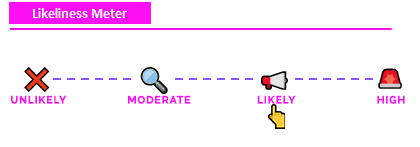
"Likeliness" Meter
Each attack is rated on the "Likeliness Meter" or how likely the attack is to happen in the real world.
-
Unlikely: Most likely won't happen (never say never).
-
Moderate: Has a chance of happening given certain context and dependencies (i.e. the attacker has to be on the same WiFi network).
-
Likely: Could happen, especially if certain conditions are met (and security controls have not been met).
-
High: Will likely happen given conditions (i.e. brute forcing passwords on an open SSH server).
Why?: Security training often focuses on disparate attack tactics and techniques without disclosing whether the attack would actually be real-world. As we are interested in the security components of these labs, it's important to know how likely an attack were to actually happen.
Exercise Files
Exercise files are used throughout Cloud & Attacks 101.
1) A login page for our ProjectX Internal portal.
2) Dockerfiles and configuration files for our web, dns, and ftp containers.
You are welcomed to download these project files, the full code is also embedded in the guides.
Clone the repository: git clone https://github.com/projectsecio/exercise-files/tree/main/networks-attacks-101
Hosts
In addition to our original topology, we have a one extra VM and three new containers (denoted by 🌟).
| Hostname [project-x-…] | IP Address | Function | Core Section |
|---|---|---|---|
-dc (corp.project-x-dc.com) |
10.0.0.5 | Domain Controller (DNS, DHCP, SSO) | E101 |
corp-svr |
10.0.0.8 | SMTP Relay Server | E101 |
-sec-box |
10.0.0.10 | Dedicated Security Server | E101 |
-sec-work |
10.0.0.103 or (dynamic) | Security Playground | E101 |
-win-client |
10.0.0.100 or (dynamic) | Windows Workstation | E101 |
-linux-client |
10.0.0.101 or (dynamic) | Linux Desktop Workstation | E101 |
attacker |
dynamic | Attacker Environment | E101 |
🌟 corp-fw |
192.168.15.2 | Router & Firewall | NA101 |
🌟 corp-svr-web-svr |
10.0.5.10:80 | Web Server | NA101 |
🌟 corp-svr-dns-svr |
10.0.5.10:53 | DNS Server | NA101 |
🌟 corp-svr-ftp-svr |
10.0.5.10:21 | File Server | NA101 |
Changes to IP Topology
Networks & Attacks 101 will be broken down into two parts.
1) Infrastructure provisioning and attacks. Here, our IP addresses will stay the same as they did in Enterprise 101.
2) Defenses deployed. This is where the changes to IP addresses will change.
Our IP topology will be changing after we deploy pfSense ([project-x-corp-fw]), which will be the first defensive tool we use.
| Hostname [project-x-…] | IP Address | Function | Core Section |
|---|---|---|---|
-dc (corp.project-x-dc.com) |
192.168.15.25 | Domain Controller (DNS, DHCP, SSO) | E101 |
corp-svr |
10.0.5.10 | SMTP Relay Server | E101 |
-sec-box |
192.168.15.50 | Dedicated Security Server | E101 |
-sec-work |
192.168.15.8 or (dynamic) | Suricata | NA101 |
-win-client |
192.168.15.5 or (dynamic) | Windows Workstation | E101 |
-linux-client |
192.168.15.6 or (dynamic) | Linux Desktop Workstation | E101 |
attacker |
dynamic | Attacker Environment | E101 |
corp-fw |
192.168.15.2 (LAN) | Router & Firewall | NA101 |
corp-svr-web-svr |
10.0.5.10:80 | Web Server | NA101 |
corp-svr-dns-svr |
10.0.5.10:53 | DNS Server | NA101 |
corp-svr-ftp-svr |
10.0.5.10:21 | File Server | NA101 |
Accounts & Passwords
All passwords will stay the same, we will have a few new ones added (denoted by 🌟)..
| Account | Password | Host | Core Section |
|---|---|---|---|
| Administrator | @Deeboodah1! | ...-dc | E101 |
| [email protected] | @password123! | ...-win-client | E101 |
| janed@linux-client | @password123! | ...-linux-client | E101 |
| project-x-sec-work | @password123! | ...-sec-work | E101 |
| sec-work@sec-box | @password123! | ...-sec-box | E101 |
| project-x-admin@corp-svr | @password123! | …-corp-svr | E101 |
| attacker@attacker | attacker | attacker | E101 |
| 🌟 admin | pfsense | ...-corp-fw | NA101 |
| 🌟 [email protected] | smile | ...-corp-svr-web | NA101 |
Downloads
ISOs are used to provision operating systems. There are a couple ways you can download these files.
Method 1: Preferred (if possible)
Method 2: Direct Install
Operating Systems
Virtual Machines (VMs)
VirtualBox or VMware Workstation Pro can be used as our hypervisor for virtualization.
Reference below for Virtual Machine specifications. These are important.
| VM Name | Operating System | Specs | Storage (minimum) |
|---|---|---|---|
| [project-x-corp-svr-fw] | FreeBSD | 1 CPU / 2048 MB | 50 GBs |
Tools
Enterprise Tools + Defense
Offense
Guides Numerical Order
The numerical order for the step-by-step guides is already in place based on the navigation menu. These guides serve as the basis for the project. It is recommended the respective guide docs page is opened while following along in the program.
👉 If you prefer to follow content by reading, these guides on this docs site will provide the same information as the video lectures.
Guides
Guides Format
The screenshots always conform to step in text, then screenshot evidence below it.
We hope you enjoy this core section!
Made with ♥ by ProjectSecurity.io.